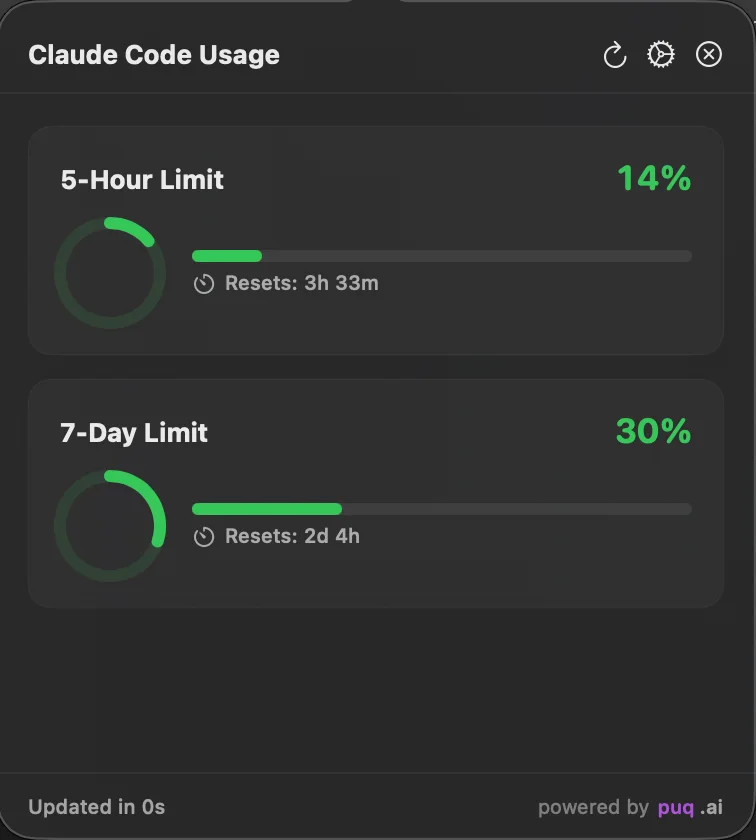
ClaudeMeter is a native macOS menu bar utility for monitoring Claude Code usage without repeatedly returning to the terminal. It keeps the five-hour and seven-day usage windows, reset times, and warning thresholds visible in a compact desktop interface.
The problem
Claude Code is centered on terminal workflows, but usage limits are easy to lose sight of during long sessions or while moving between several tasks. Checking them manually interrupts the current context and makes it harder to plan intensive work near a reset boundary.
The goal was to make this information continuously available while preserving a quiet, native macOS experience.
Product goals
- Keep the most important usage windows one click away in the menu bar
- Show reset times and per-model weekly limits in a readable format
- Warn at useful thresholds without producing repeated notifications
- Preserve the last known state during temporary connectivity problems
- Switch to a second data path when the primary usage API fails
- Remain lightweight and avoid unnecessary desktop complexity
Main capabilities
Usage visibility
The application supports icon, compact, and detailed display modes. It tracks the five-hour and seven-day windows, the per-model weekly limits the API reports in its limits array, and extra usage, and presents reset times directly in the menu bar interface. Because each scoped limit names itself, a new model limit appears without waiting for an app update.
Notifications
System notifications can be enabled for 75%, 90%, and 95% usage thresholds. A throttling layer prevents the same state from generating noisy repeated alerts.
Refresh and offline behavior
Polling adapts to activity rather than running at a single aggressive interval. A cache preserves the last successful response, allowing the interface to remain useful during a temporary network failure.
claude.ai fallback and in-app sign-in
When the primary usage API fails or is rate limited, the app falls back to the claude.ai web API. While the primary is rate limited and the fallback works, the primary is skipped instead of being retried on every tick; if the fallback also fails, the primary reopens immediately, so the user is never left without a data source.
- The claude.ai connection is made through an in-app sign-in window instead of copying cookies out of browser devtools.
- The resulting session key is validated against the organizations endpoint before it is accepted, which also resolves the organization id.
- The session key is stored in the app’s own Keychain item; a plaintext key left by an earlier version is migrated on launch and removed.
- Without credentials, the menu bar shows a warning instead of a green 0%, and the popover offers a way to connect.
Architecture
ClaudeMeter is implemented as a SwiftUI menu bar application with explicit service boundaries:
APIServicefetches usage data and owns retry and failure handling.KeychainServicereads existing Claude Code credentials and stores the claude.ai session key in the app’s own Keychain item.NotificationServicemanages thresholds and macOS notifications.PollingManagercontrols the adaptive refresh lifecycle.CacheManagerpersists the last known usage state.DependencyContainerconnects these services without coupling them to views.
This separation keeps credentials, networking, cache state, polling, and presentation independently understandable and testable.
Installation
The application targets macOS 13 Ventura or later and can be installed from a GitHub release or built with Xcode 15+.
git clone https://github.com/puq-ai/claude-meter.git
cd claude-meter
xcodebuild -scheme ClaudeMeter -configuration Release build
ClaudeMeter uses the existing Claude Code session, so the CLI authentication flow must be completed first:
claude login
For the fallback data path, you can also sign in to claude.ai from inside the app.
Links
Engineering notes
Although ClaudeMeter is a small menu bar utility, it coordinates several independent concerns: data refresh, offline state, Keychain access, and notification frequency. Separating the interface from the service layer keeps those behaviors visible, testable, and easier to change independently.
The fallback work in v1.3.0 reinforced the same lesson: a backup path has to be reachable exactly when the primary is unusable. Expired credentials that failed before any network call, a local clock deciding token validity, and a successful fallback that kept the rate-limit cooldown from ever arming while the primary still returned 429 were each fixed separately and covered by tests.