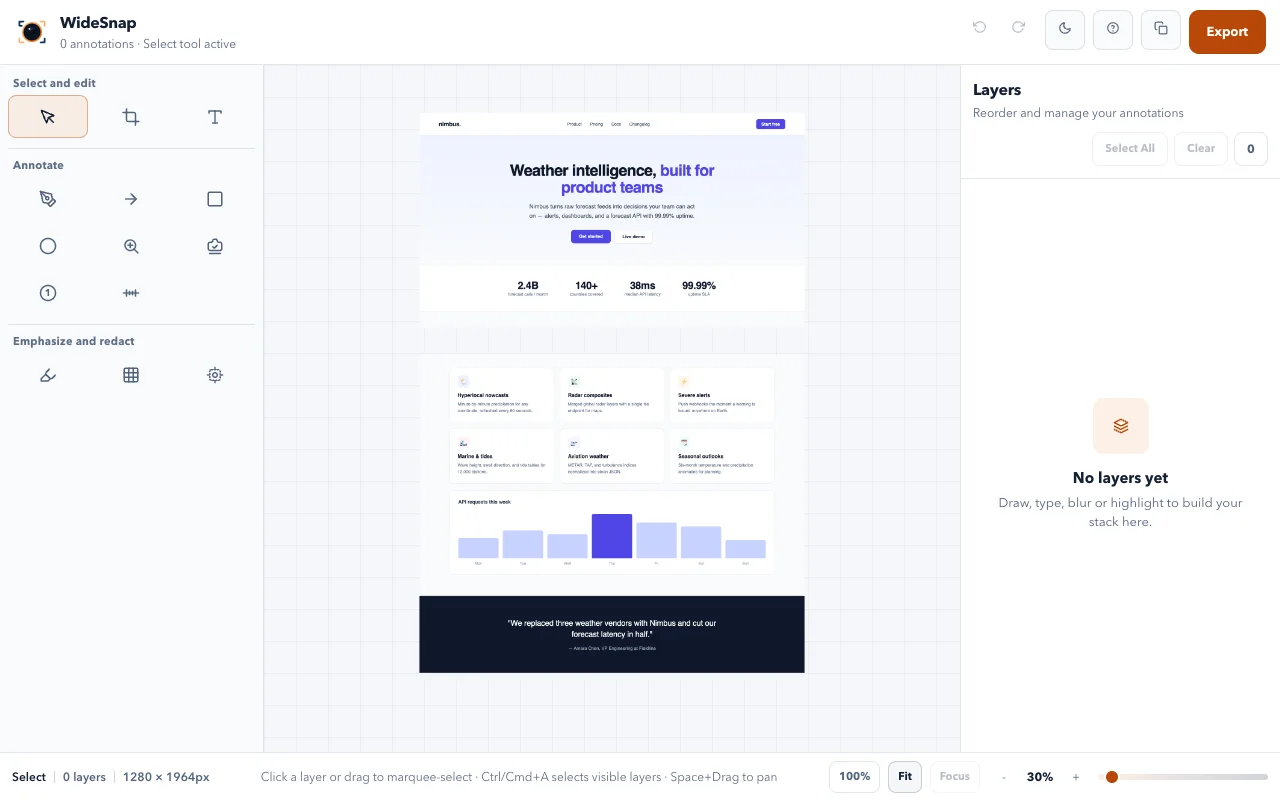
WideSnap is a Chrome extension I built for capturing, annotating, and recording directly in the browser. A single screenshot often explains a bug or a design comment better than a paragraph, so the extension puts capture, editing, and export in one place.
The problem
A full-page screenshot usually takes several tools: one to capture the page, another to stitch it, another to add arrows or blur private data, and another to record a short video. Each step loses time, and many tools upload the image to a server along the way.
Product goals
- Capture the whole page, including the parts below the fold
- Keep annotation and export in the same window
- Process screenshots and recordings locally in the browser
- Stay reliable when Chrome stops an idle background worker
Main capabilities
- Full-page capture with scroll-and-stitch, including inner scroll containers and sticky or fixed headers
- Visible-area capture, region capture with a keyboard shortcut, and delayed capture with a countdown
- An annotation editor with 14 tools, such as arrows, text, shapes, highlight, blur, pixelate, spotlight, magnifier, and numbered markers
- Tab or selected-area recording in 480p, 720p, or 1080p WebM
- Export to PNG, JPG, WebP, and PDF, and recordings to WebM or short GIFs
- Draft autosave, local history, and an interface in six languages
Architecture
The extension uses Manifest V3 with React 19, TypeScript, Vite, and CRXJS; the editor canvas is built with Konva. Capture coordination keeps a session journal so it can recover when Chrome terminates the service worker. The Web Locks API prevents races between parallel storage writes, content scripts accept only trusted user events, and recording runs in an isolated offscreen document.
Verification
Unit tests run with Vitest, and Playwright end-to-end tests load the built extension in Chromium. A release check verifies that the package, lockfile, manifest, changelog, and tag versions match before a Chrome Web Store upload.